文档编辑保护
💡 调用API,需要认证。认证参考【接口认证】
POST {apiPrefix}/protect
提交文档编辑保护任务
- 任务添加失败,同步返回失败原因
- 任务添加成功,同步返回任务ID。第三方可以配置任务回调通知获取任务状态。
- 源文件最大300M
请求体:
Content-Type为application/json
| 参数名 | 类型 | 说明 | 是否必须 |
|---|---|---|---|
| callback | string | 回调地址。任务结束后zOffice回调通知状态 | 是 |
| tokenType | string | 三方token类型,值为cookie或者header | 否 |
| tokenValue | string | 三方token值,zOffice下载文件或回调通知时回传 | 否 |
| filename | string | 文件名称,必须有后缀名,仅支持doc/docx/wps。源文件最大300M | 是 |
| fileUrl | string | 文件下载路径 | 是 |
| protectionAct | string | enable:开启保护(将文档设置为只读,需要使用密码开启编辑);disable:关闭保护 | 是 |
| password | string | 编辑密码,先进行AES/ECB/PKCS7Padding加密,再进行base64加密。 | 否 |
- fileUrl/tokenType/tokenValue/callback说明见本文档【通用字段说明】
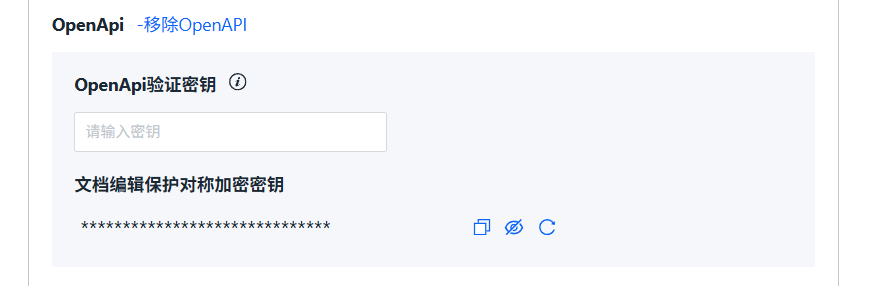
- password加密示例见下方"密码加密java代码示例"。加密使用的密钥在管理控制台的集成应用中开启OpenApi时会自动生成,可以在控制台重置、查看、复制。
- 如果文档已开启编辑保护,请确认执行效果是想要的。见下方的效果总结。
正常返回:
{
    "taskId": "6f6598c8-c87e-420b-b6c4-6f1b187201dc",
    "code": "Ok",
    "detail": {
        "taskStatus": "IN_QUEUE"
    }
}
错误返回:
{
    "taskId": "695fbf6e-90d2-42ba-83d5-00e81e5e366e",
    "code": "TaskQueueCongestion",
    "detail": {
        "taskStatus": "FAIL"
    }
}
各种情况执行效果:
如果文档已开启编辑保护,请确认执行效果是想要的。
| 执行前文档情况 | 调用api类型 | 执行后文档情况 |
|---|---|---|
| 关闭编辑保护 | 开启保护 | 开启编辑保护,模式为只读 |
| 关闭编辑保护 | 关闭保护 | 关闭编辑保护 |
| 开启编辑保护 | 开启保护 | 密码变为api设置的密码,模式变为只读(不论之前是什么模式) |
| 开启编辑保护 | 关闭保护 | 关闭编辑保护(不论之前是什么模式) |
密码加密java代码示例:
import java.nio.charset.StandardCharsets;
import java.security.Security;
import java.util.Base64;
import javax.crypto.Cipher;
import javax.crypto.spec.SecretKeySpec;
import org.bouncycastle.jce.provider.BouncyCastleProvider;

public class Aesdemo {

    static {
        Security.addProvider(new BouncyCastleProvider());
    }

    private static final String SECRET = "AES";
    private static final String CIPHER_ALGORITHM = "AES/ECB/PKCS7Padding";
    public static void main(String[] args) throws Exception {
        // secret即密钥,要与zoffice中配置的LS_DOCSCOMMON_3RD_PARTY_INTEGRATION_THIRDPARTY_0_SECRETS_RAND32一致,必须是32位
        String secret = "00000000000000000000000000000000";
        String password = "123456";
        // 加密
        Cipher cipher = Cipher.getInstance(CIPHER_ALGORITHM);
        byte[] keyBytes = secret.getBytes(StandardCharsets.UTF_8);
        cipher.init(Cipher.ENCRYPT_MODE, new SecretKeySpec(keyBytes, SECRET));
        byte[] doFinal = cipher.doFinal(password.getBytes(StandardCharsets.UTF_8));
        String enp = new String(Base64.getEncoder().encode(doFinal));
        System.out.println(enp);
        // 解密
        Cipher cipher2 = Cipher.getInstance(CIPHER_ALGORITHM);
        cipher2.init(Cipher.DECRYPT_MODE, new SecretKeySpec(keyBytes, SECRET));
        byte[] doFinal2 = cipher2.doFinal(Base64.getDecoder().decode(enp));
        String dep =  new String(doFinal2);
        System.out.println(dep);
    }
}