Document Compare API POST Integration
Starting from v8.2, Filez Document Platform standard integration supports calling the document compare API via POST form.
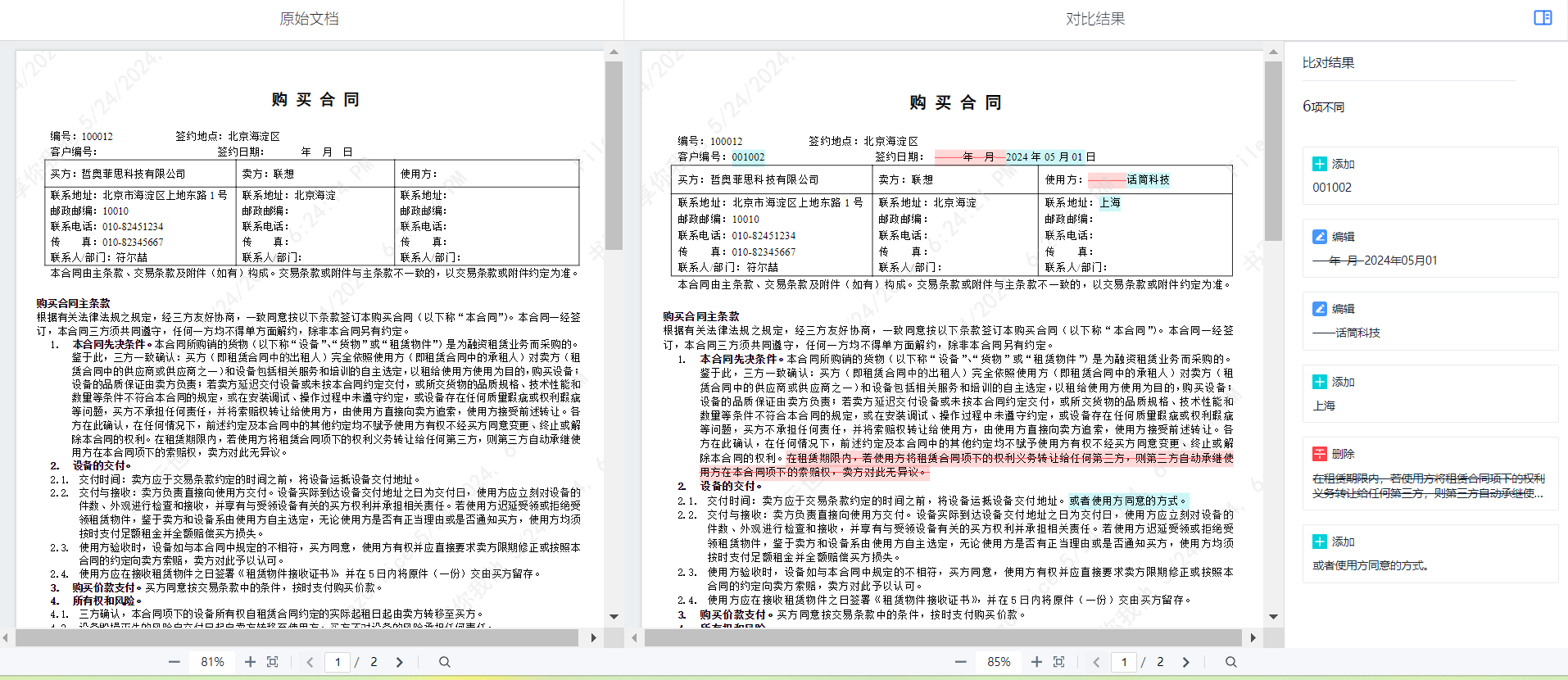
Description: The document compare API is used to compare the differences between two text documents with similar content. Users need to provide two text documents with similar content, such as document A and document B. The comparison result is provided as an HTML page that displays the original document, the comparison document, and their differences.
Unlike the Standard Integration approach that carries parameters in the URL via GET requests, POST integration puts compare parameters and authentication tokens in the form request body, avoiding exposure of sensitive information in the browser address bar. The POST parameter mechanism is consistent with online editing/preview. See Security for details.
API Description
POST http(s)://{zofficehost}/docs/app/{repoId}/compare
Content-Type: application/x-www-form-urlencoded
| Parameter Name | Required | Description |
|---|---|---|
| docA | Yes | Document A ID in the business system, corresponding to the original document in the display page |
| docB | Yes | Document B ID in the business system, corresponding to the comparison document in the display page |
| access_token | Yes | Business system access token. The form field name is fixed as access_token. The document platform automatically maps it to the token name configured in the management console (e.g., zdocs_access_token) |
| versionA | No | Version identifier for document A. Required when comparing different versions of the same document |
| versionB | No | Version identifier for document B. Required when comparing different versions of the same document |
When docA and docB are the same, both versionA and versionB must be provided, and they must be different.
Integration Example
The business system page submits the compare request via a hidden form POST and displays the result in an iframe:
<!DOCTYPE html>
<html lang="en">
<head>
  <meta charset="UTF-8">
  <style type="text/css">
    body {
      margin: 0;
      padding: 0;
      overflow: hidden;
    }
    #compare_frame {
      width: 100%;
      height: 100%;
      position: absolute;
      top: 0;
      left: 0;
      right: 0;
      bottom: 0;
      margin: 0;
      border: none;
      display: block;
    }
  </style>
</head>
<body>
  <form style="display: none;" id="compare_form" name="compare_form" target="compare_frame"
        action="http://{zofficehost}/docs/app/{repoId}/compare" method="post">
    <input name="docA" value="{docAId}" type="hidden" />
    <input name="docB" value="{docBId}" type="hidden" />
    <input name="access_token" value="{access_token}" type="hidden" />
  </form>

  <span id="frameholder"></span>

  <script type="text/javascript">
    var frameholder = document.getElementById('frameholder');
    var compare_frame = document.createElement('iframe');
    compare_frame.name = 'compare_frame';
    compare_frame.id = 'compare_frame';
    compare_frame.title = 'Document Compare Frame';
    compare_frame.setAttribute('allowfullscreen', 'true');
    frameholder.appendChild(compare_frame);
    document.getElementById('compare_form').submit();
  </script>
</body>
</html>
JSSDK Mount
Business systems can also initiate document compare via POST using JSSDK's ZOfficeSDK.mount, without manually creating a form. Pass an object as the first parameter and the SDK will automatically construct a form POST request and insert an iframe under the mount node to display the compare result page.
<!DOCTYPE html>
<html lang="en">
<head>
  <meta charset="UTF-8" />
  <title>SDK Document Compare</title>
  <script src="sdk.js"></script>
  <style>
    html, body { height: 100%; margin: 0; padding: 0; overflow: hidden; }
  </style>
</head>
<body>
  <div id="compare-container" style="height: 100%;"></div>
  <script>
    ZOfficeSDK.mount({
      url: 'http://{zofficehost}/docs/app/{repoId}/compare',
      docA: '{docAId}',
      docB: '{docBId}',
      access_token: '{access_token}'
    }, '#compare-container');
  </script>
</body>
</html>
Parameter description:
| Property | Required | Description |
|---|---|---|
| url | Yes | Compare API address without query parameters |
| docA | Yes | Document A ID in the business system |
| docB | Yes | Document B ID in the business system |
| access_token | Yes | Business system access token. Form field name is fixed as access_token |
| versionA | No | Version identifier for document A. Required for same-document version compare |
| versionB | No | Version identifier for document B. Required for same-document version compare |
When the first parameter of ZOfficeSDK.mount is an object, the SDK submits parameters via form POST, equivalent to manual form integration. See Mount Document - Other forms of the url parameter.
Authentication and Callbacks
POST integration authentication and callback flow is consistent with Standard Integration:
- The document compare API can only be called after online editing integration is complete.
- The document platform server first callbacks the Get User Profile API (profiles API) to get current user information and verify the token.
- The document platform server callbacks the business system's Get File Meta API (meta API) based on docId to get file metadata.
- The document platform server callbacks the business system's Get File API (get content API) based on docId to get file content.
Compare Result Page Internal Behavior
After the compare task completes, the result page loads two sub-document preview windows (left and right). Under POST integration, sub-document previews also pass zdocsToken via form POST, without relying on cookies or carrying tokens in the URL.
Notes
- The token field name in the form is fixed as
access_token, consistent with the POST approach for online editing/preview. - Currently only supports doc / docx documents, size not exceeding 50M.
Currently only supports doc / docx documents, size not exceeding 50M