Document Compare
Starting from v7.2, Filez Document Platform provides document compare API.
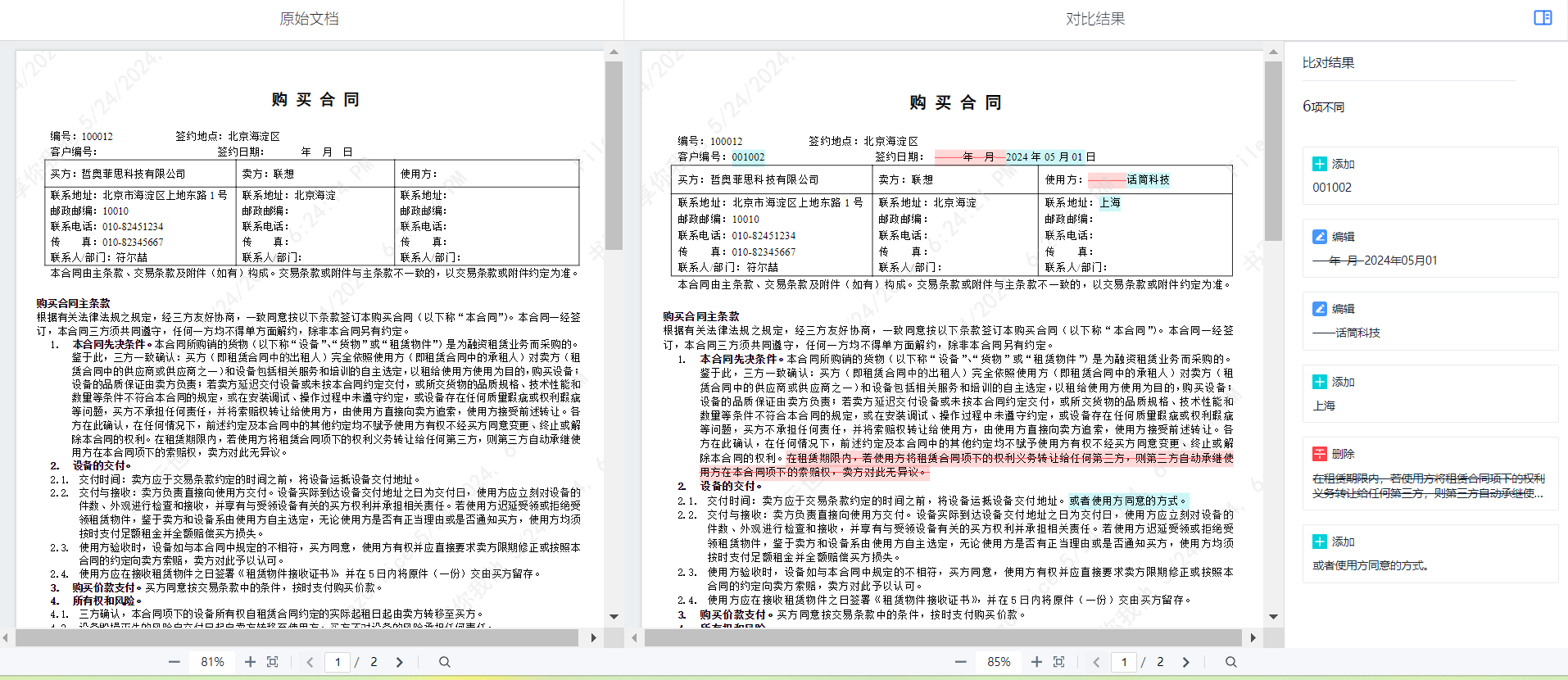
Description: Document compare API is used to compare the differences between two text documents with similar content. Users need to provide two text documents with similar content. For example, document A and document B, the comparison result is provided in the form of an HTML page. The HTML page displays the original document and the comparison document, as well as their differences.
Usage: Access the following interface, which will return the comparison result page. Where docAId and docBId are the ids of document A and document B in the business system. (docAId is the original document in the display page, docBId is the comparison document in the display page)
http://{{zofficehost}}/docs/app/{{repoId}}/compare?docA={{docAId}}&docB={{docBId}}
Notes:
-
Document compare API can only be called after users complete online editing integration.
-
The corresponding Auth is consistent with online editing. For example, include token in the URL,
http://{{zofficehost}}/docs/app/{{repoId}}/compare?docA={{docAId}}&docB={{docBId}}&zdocs_acess_token=xxxxx
- Consistent with online editing
-- Filez Document Platform server will first callback profiles API to get current user information and verify token
-- Filez Document Platform server will callback the business system's meta API based on docId to get the meta information of the file related to this docId.
-- Filez Document Platform server will callback the business system's get content API based on docId to get the file represented by this docId
- Currently only supports doc /docx documents, size not exceeding 50M