Management Console Configuration for Open API Related Settings
Third-Party System Related Configuration
When business systems call the Document Platform's Open API, they generally have completed the integration of document online editing/preview. If already completed, you can skip this step.
Open the management console, on the third-party application configuration page. Notes:
- Third-party Application ID: The ID of the integrated third-party application, such as: oa, contract, weaver, uni-document, etc. Determined by the third-party business system. This application ID is the repoId that needs to be passed when calling Open API and calculating the Auth header.
- Third-party System Address: For example, http://172.16.22.23:8088/demo/files. The hostname is 172.16.22.23. When calling open API, the hostname of the fileUrl and callback passed must be consistent with the hostname defined here.
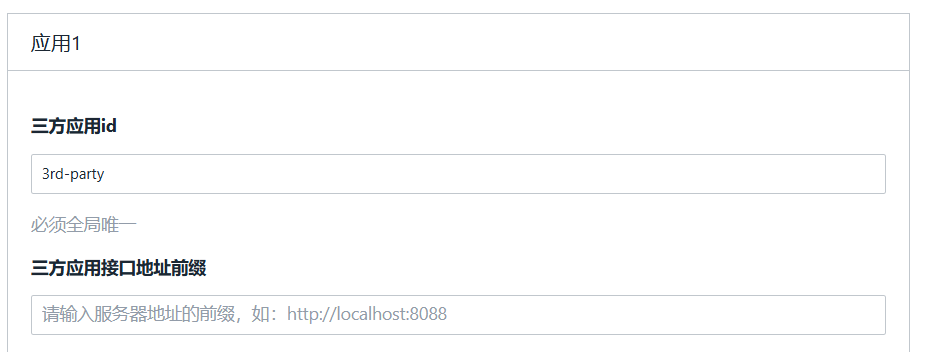
Filez Document Platform Open API Secret Key Configuration
-
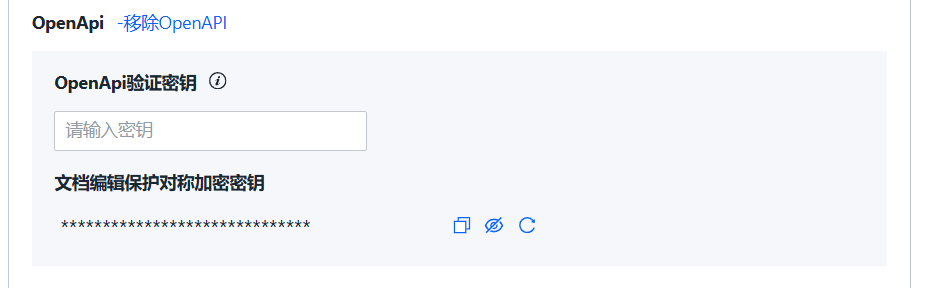
OpenAPI verification secret key is the secret key agreed upon between zOffice service and third-party service. Used to encrypt Auth Token when third parties call zOffice server API.
-
Use the following command to generate a 64-bit length random secret key command. The secret key cannot contain line breaks. If third parties think 64-bit is not secure enough, they can generate a 128-bit length secret key by replacing the last bit below with 128.
openssl rand -base64 64