Call Sequence
Call Mode
The Document Platform server API mainly processes file formats and content. For example, the conversion API can convert Word files to PDF files, and the content processing API can add content watermarks to Word files. The general calling method is:
-
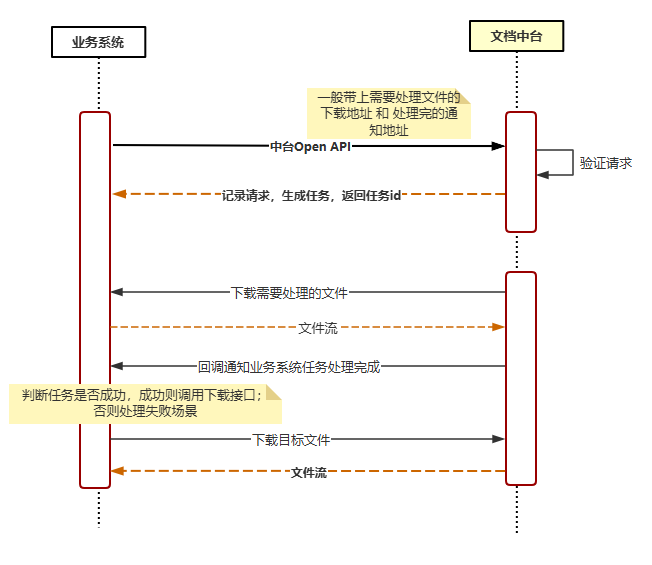
The business system server calls the Filez Document Platform server Open API. When calling, it passes the download address of the file to be processed and the notification address when processing is complete.
-
After the Document Platform server receives the request and verification passes, the Document Platform server internally creates a task to start processing, and immediately returns relevant information to the business system caller.
-
When the Document Platform server processes the task, it downloads the file from the business system according to the file download address provided during the API call.
-
After the Document Platform server obtains the file and successfully processes it, it notifies the business system to download the file according to the notification address provided during the API call.
-
The business system downloads the result file from the Document Platform according to the Document Platform's notification information, completing the call.
Asynchronous Mode
When a third-party system calls the platform's conversion interface, the platform will immediately record the request and generate a corresponding task. Subsequently, the platform will return a task ID to the third-party system.
After the task is completed, the platform will actively call the callback interface provided by the third-party system to notify the final result of the task.
If the task is successfully completed, the notification will include relevant information about the result file; if the task fails, the notification will include detailed reasons for the failure.
The advantages of this asynchronous design are:
-
Improve system response speed: Since requests and task processing are asynchronous, callers do not need to wait for task completion, but can continue to perform other operations, improving the overall response speed of the system.
-
Improve system scalability: Asynchronous design allows the system to better adapt to high concurrency situations because it does not return only when each request is completed, thus avoiding blocking issues.
-
Enhance user experience: Users do not need to wait for a long time for operations to complete. Asynchronous calls allow them to get feedback faster and can continue with other operations while waiting.
Synchronous Mode Simulation
The Document Platform provides a task status query API. Business systems can achieve similar synchronous call effects by cyclically calling the task status query API.
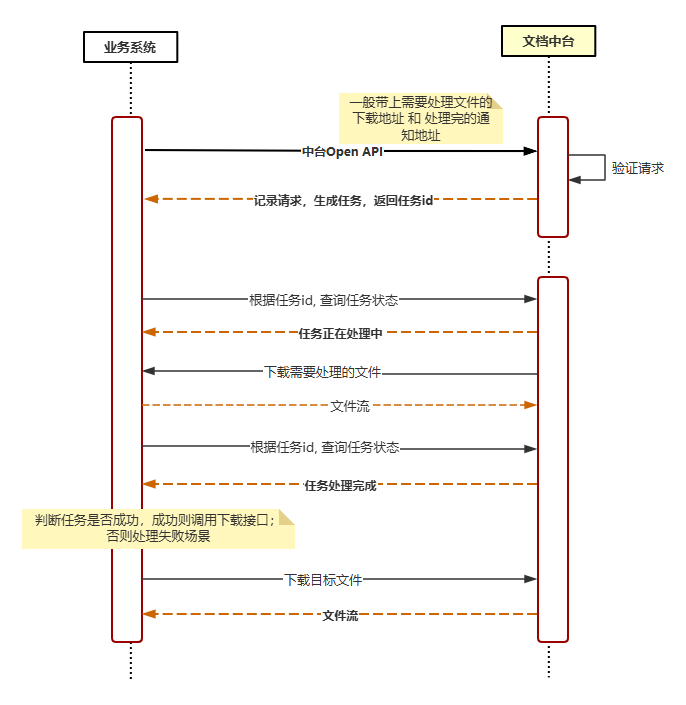
- The business system server calls the Filez Document Platform server Open API. When calling, it passes the download address of the file to be processed and the notification address when processing is complete.
- After the Document Platform server receives the request and verification passes, the Document Platform server internally creates a task to start processing, and immediately returns relevant information to the business system caller.
- The business system queries the task status after a certain interval (at least 200ms).
- The Document Platform returns the current status of the task according to the task status, for example: waiting.
- The Document Platform starts processing the task, and downloads the file from the business system according to the file download address provided during the API call.
- The business system queries the task status after a certain interval (at least 200ms).
- The Document Platform returns the current status of the task according to the task status, for example: task successfully completed, and provides download result information.
- The business system downloads the result file from the Document Platform according to the download result information, completing the call.