Frontend Integration Passive Parameter Mode
Integration Diagram
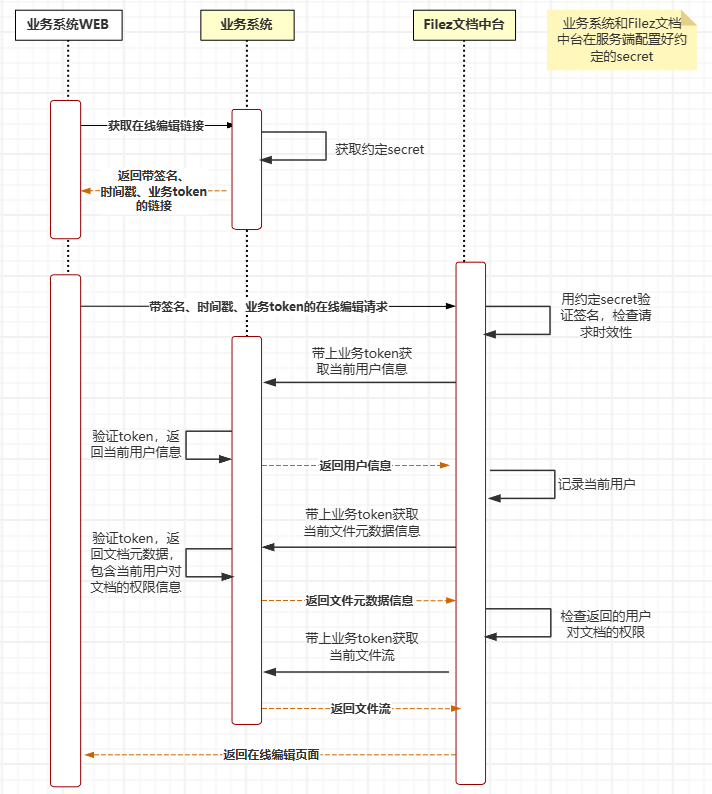
- Filez Document Platform and the business system need to agree on a secret to calculate the HMAC of the request URL
- When the business system frontend needs to call online editing/preview services, it requests the business system's server. The business system's server generates the online editing/preview URL based on the secret. The URL format is as follows:
http(s)://${zOffice_domain}/docs/app/driver-callback?repoId=${repoId}&docId=${docId}&action=edit¶ms=${params}&ts=${ts}&HMAC=${hmac}
See Request Parameters for all request parameters.
- After the Filez Document Platform server receives the request, it first verifies whether the request is correct based on the HMAC value to ensure that related parameters are not tampered with.
- Verify whether the request has expired based on
ts(timestamp) to ensure that online editing/preview requests are not arbitrarily propagated. By default, an online editing/preview request URL address is valid for 10 seconds. The business system and Filez Document Platform need to have synchronized time. - With the parameters defined in params, call back the profiles API callback interface implemented by the business system in the third-party integration standard method to obtain current editing user information.
- With the parameters defined in params, call back the meta API callback interface implemented by the business system in the third-party integration standard method to obtain the meta information of the current editing file, including permission information.
- With the parameters defined in params, call back the GET content API callback interface implemented by the business system in the third-party integration standard method to obtain the current editing file stream.
(For detailed interface information, please read "Filez Document Platform - Integration Edition Third-Party Standard Integration Interface Documentation")
Passive Parameter Mode
Request Address:
GET http(s)://${zOffice-server-IP}:${zOffice-server-port}/docs/app/driver-callback
Request Parameter Definitions:
| Parameter Name | Required | Description |
|---|---|---|
| repoId | Yes | Unique identifier ID of the third-party service in zOffice, defined by the third-party service itself, and needs to be declared in the zOffice configuration file at the same time |
| docId | Yes | Unique ID of the document in the third-party system |
| action | No | Identifies the behavior of opening the document, value can be edit or view, default is view |
| params | No | Information that needs to be passed back, format key=value;key2=value2, see params description below for details |
| ts | Yes | Timestamp when the URL was generated, precision in milliseconds |
| HMAC | Yes | Salted hash value of the request URL, used to verify whether the request address has been tampered with |
Example
http://luoshuhost:8001/docs/app/driver-callback?
repoId=thirdpart-rest&
docId=demo-docx&
action=edit&
params=3rd-party-token=xxx;id=demo-docx-123;x-webhook-header=xxx&
ts=1685673093648&
HMAC=8b48d4833bd2e22203eb890c91a6fe08df6056bf3bda126ab31e5a9d9c04aad5
params
Information passed in params will be passed back in header, cookie, and queryParams when calling third-party interfaces.
For example, when params=x-param-1=aaa;x-param-2=bbb, and the third-party interface is /v2/context/docId/content, the actual request received by the third party is as follows:
Request Address: /v2/context/docId/content?x-param-1=aaa&x-param-2=bbb
Request Headers:
x-param-1: aaa
x-param-2: bbb
Cookie: x-param-1=aaa;x-param-2=bbb
Note: Parameters that need to be passed back in the header must start with x- (can be modified through special configuration headerPrefix default value)